← All features

Prepare your dining room before guests arrive

Make room for guests. And better organisation.

Receive requests online and view bookings alongside restaurant availability. Set sittings, capacity and closed dates, then manage confirmations in your dashboard.

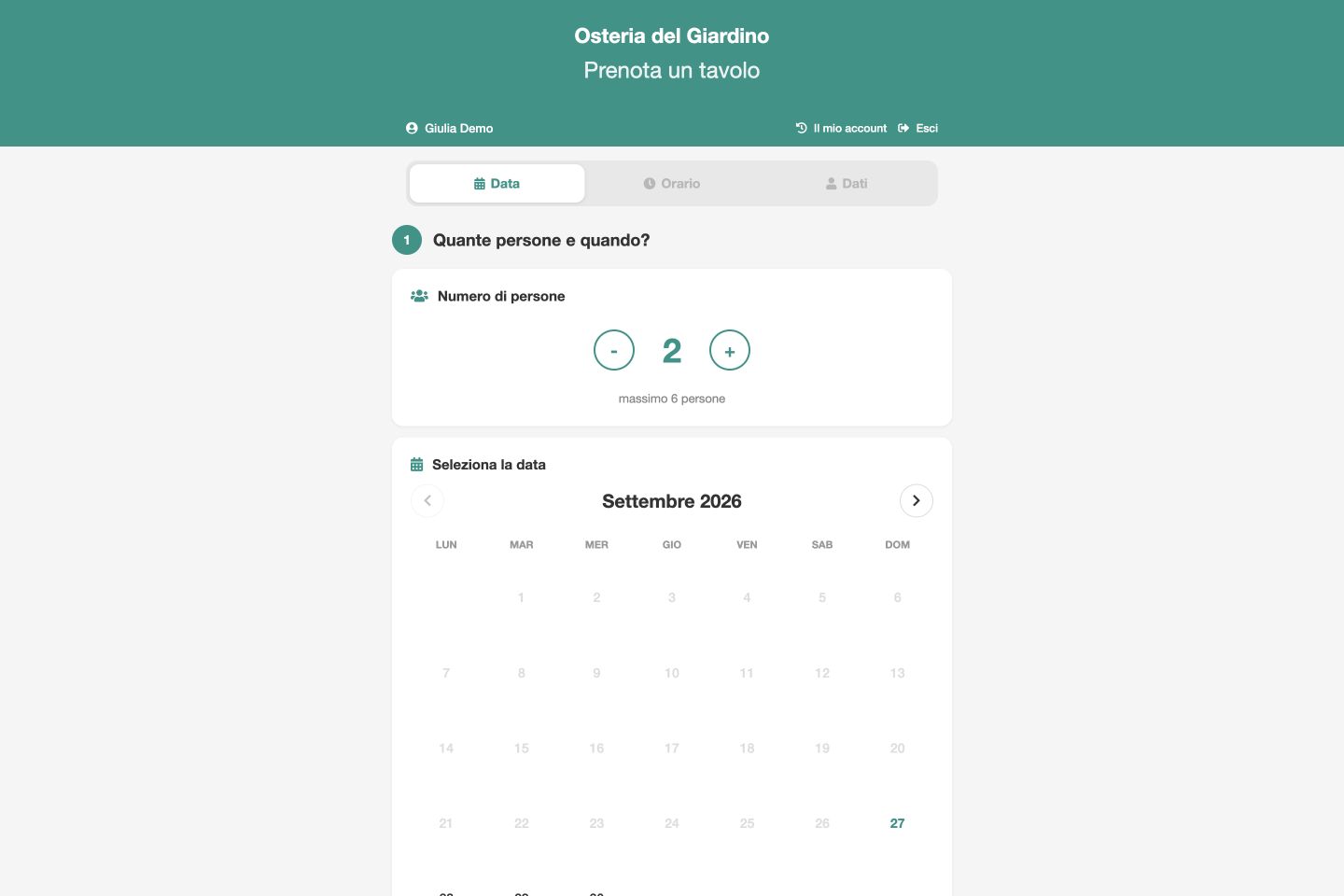
Guests, date, time. One step at a time.Enlarge screenshot ↗
Real APPetito screenshot · Demo data

SEE HOW IT WORKS

Inside the tools.
In your everyday work.

Product screenshots with the essential steps. Open the images to see the details.

01 / FOR YOUR CUSTOMERS

Guests, date, time. One step at a time.

La pagina di prenotazione guida il cliente nella scelta. Prima indica il numero di persone e la data; poi consulta gli orari e inserisce i dati richiesti.

  • Calendar to choose a date
  • Separate steps for time and customer details
02 / FOR YOUR RESTAURANT

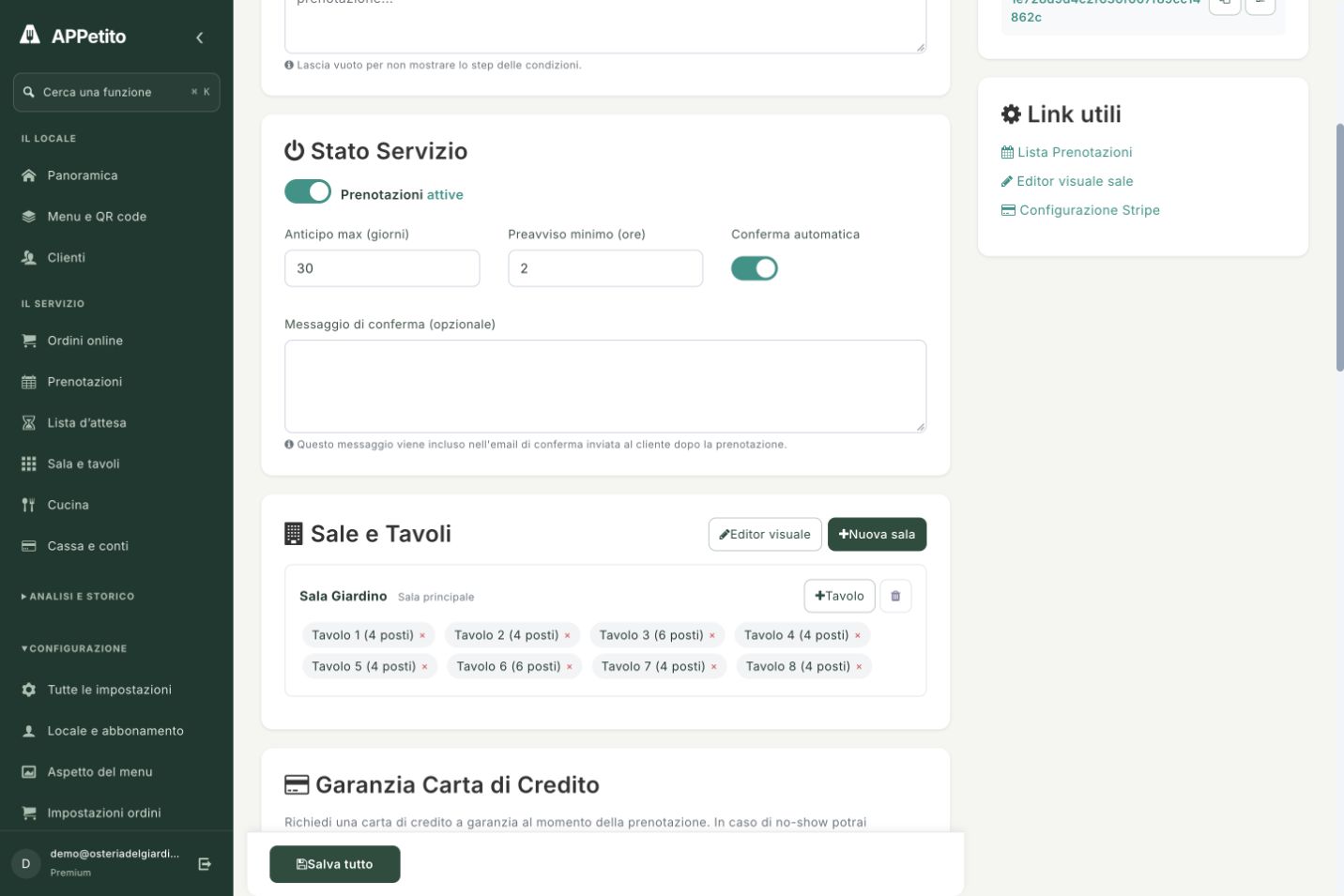
Availability starts with your rules.

Imposti il preavviso minimo, quanto in anticipo si può prenotare e la modalità di conferma. Sale e tavoli descrivono i posti del locale; turni e chiusure completano la configurazione.

  • Configurable automatic confirmation
  • Rooms, tables and seating capacity
Availability starts with your rules.Enlarge screenshot ↗
Real APPetito screenshot · Demo data

A PRACTICAL EXAMPLE

Imagine it in your restaurant.

A couple opens your restaurant link, selects two guests and chooses a date. They then select an available time and enter their details, following your booking rules.

IN YOUR EVERYDAY WORK

01

Your day at a glance

View bookings, times and party sizes, with a weekly view to organise service.

02

Flexible availability

Set up rooms, tables, capacity and sittings. Manage closures and table occupancy times to suit your restaurant.

03

Works with your existing website

Share your booking link or add the APPetito widget to your restaurant website. Tools for waiting lists and extras are also available.

GETTING STARTED

From setup
to your first use.

Bookings are included in Basic. The visual floor plan editor and table order management are part of Premium.

  1. 1

    Set up tables, sittings and availability

  2. 2

    Publish your link or widget

  3. 3

    Review and manage incoming requests

BEFORE YOU BEGIN

A few more details.

Understand how this feature fits your service.

Can I choose how to confirm bookings?

Yes. Automatic confirmation is available in settings: requests are handled according to the mode you choose.

Do I need a new website?

No. Share your booking link or use the widget on your existing website.

Are bookings and the visual floor plan in the same plan?

Bookings are available from Basic. The visual floor plan editor and table order management are part of Premium.

Real screenshot · Demo data

THE NEXT STEP IS SIMPLE

Bring APPetito
to your restaurant.

15 days to explore the features and see how they fit your service.

Start your free trial

No credit card required.
Choose the right plan for you at the end.